What is the 2026 AI innovation tech stack?

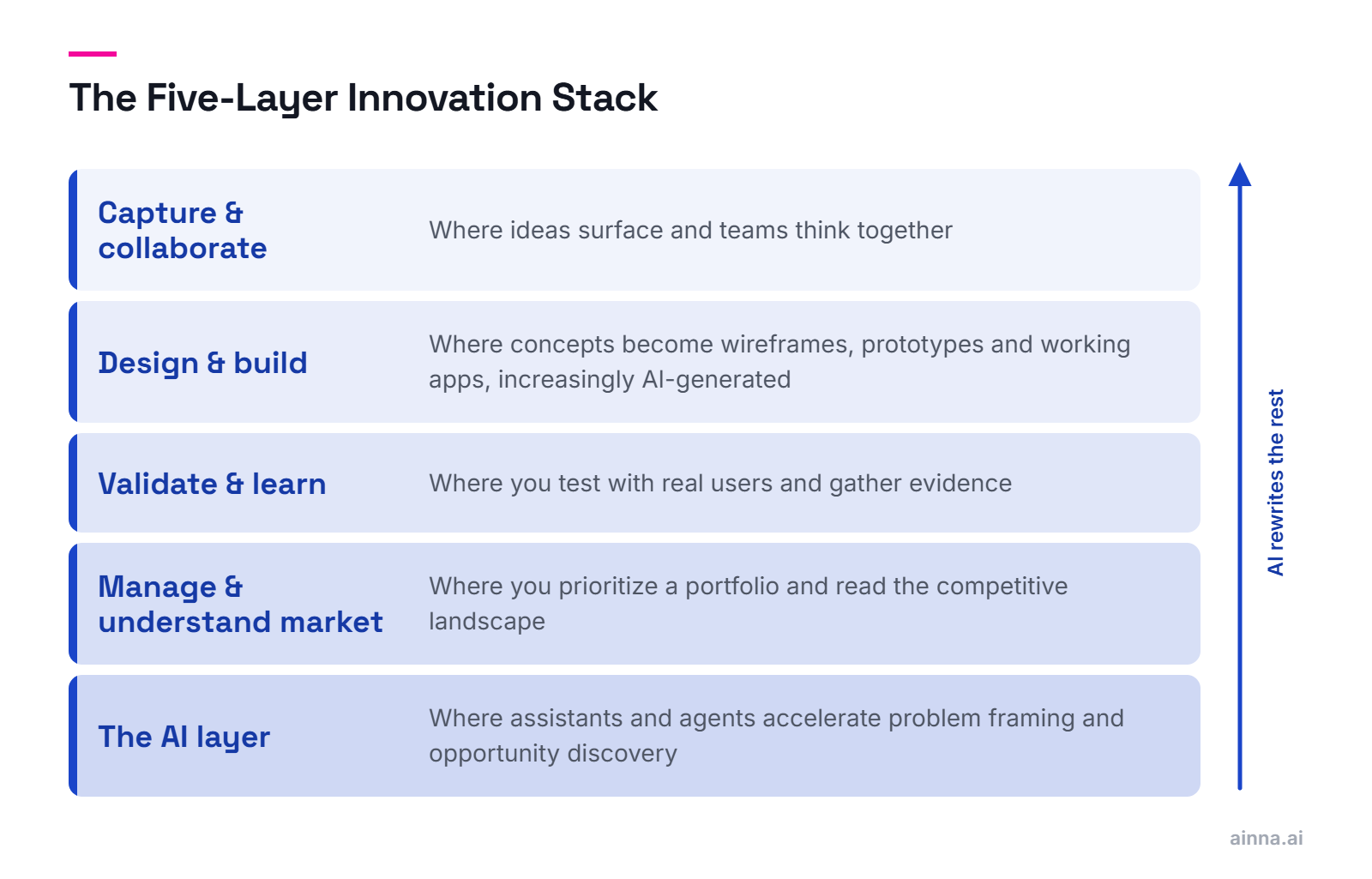
An innovation tech stack is the set of digital tools that let a team capture ideas, collaborate, prototype, validate, and manage innovation as a repeatable capability rather than a series of one-off projects. In 2026 the defining change is AI, so in our Innovation Mode methodology we organize the stack as the Five-Layer Innovation Stack: Capture and Collaborate, Design and Build, Validate and Learn, Manage and Understand the Market, and the AI layer. The first four are where the work has always happened. The fifth is now rewriting the other four.

  • Capture and Collaborate - where ideas surface and teams think together
  • Design and Build - where concepts become wireframes, prototypes, and working apps, increasingly generated from a prompt by AI
  • Validate and Learn - where you test with real users and gather evidence
  • Manage and Understand the Market - where you prioritize a portfolio and read the competitive landscape
  • The AI layer - where general-purpose assistants and purpose-built agents accelerate problem framing and opportunity discovery
  • The stack is infrastructure, not strategy: it lowers the friction of innovating, but it does not decide what is worth building
Key Takeaway

Treat the Five-Layer Innovation Stack as a map, not a shopping list. Most teams need only a few tools per layer, chosen for how they fit together and how mature the organization is.
Will better tools actually make us more innovative?

No. Tools reduce friction, but they do not create the conditions for innovation. What makes a company innovative is talented people working on problems worth solving, under leadership that sets direction and a culture that rewards experimentation. The best stack in the world will not rescue a team with no clear problem or no permission to take risks.

  • Tools remove overhead: less time documenting and sharing, more time thinking and building
  • They make innovation visible, inclusive, and measurable across a large organization
  • What they cannot supply is purpose, judgment, or the courage to pivot
  • A common failure is buying software to fix what is really a culture or leadership gap
  • Match tooling to your own innovation maturity, not to a competitor's stack
Key Takeaway

Buy tools to amplify a working innovation function, not to manufacture one. The sequence matters: direction and culture first, tooling second.

Which innovation tools got acquired or shut down recently?

The innovation tooling market has consolidated faster than most teams have updated their stacks. The design layer collapsed around a single winner, the research layer was rolled up by private equity, no-code quietly matured into production-grade software, and AI moved from assisting with tasks to participating in the work itself. The advantage is shifting upstream, away from the commoditizing middle of the stack and toward how fast a team can turn a raw idea into a framed, validated opportunity.

  • Design consolidated around Figma: InVision shut down at the end of 2024, and Adobe XD has sat in maintenance mode since the Figma acquisition was blocked
  • Research was rolled up: UserTesting absorbed UserZoom, and Qualtrics was taken private
  • Collaboration shuffled: Miro absorbed InVision's Freehand, strengthening the whiteboarding category
  • No-code matured from toy to production-grade, so the question shifted from 'can we build without engineers' to 'when should we'
  • AI crossed a line: from assisting with discrete tasks to acting as ideator, evaluator, and orchestrator in the discovery process itself
Key Takeaway

One note before the tool lists: this is an independent, unsponsored view. We have no affiliation with any tool named here, except Ainna, which we built. Nothing here is a formal endorsement, so evaluate and choose based on your own context.

How do we pick the right innovation tools for our team?

Start with the workflow you are trying to improve, not the tool. The right choice depends on your organization's size, its innovation maturity, the systems you already run, and your strategic goals. A five-person startup and a global enterprise need different stacks, and copying a competitor's tooling is a fast way to buy software you will not use.

  • Map your gap to a layer: are you weak at capturing ideas, validating them, or reading the market?
  • Weigh your innovation maturity - basic tools are fine early; orchestration matters more at scale (see the Innovation Maturity Index)
  • Favor tools that integrate with what you already run over best-in-class tools that sit in isolation
  • Prefer fewer tools used well over many tools used partially
  • For a structured assessment, my Innovation Toolkit provides templates for framing the decision
Key Takeaway

The goal is a coherent stack, not a complete one. Every tool you add is overhead unless it removes more friction than it creates.

Did you know? Ainna maps your competitive landscape automatically — positioning gaps, differentiation opportunities, and strategic whitespace, generated from your product concept. Map your landscape

Do we still need idea management software?

Idea management software solved the wrong problem. The bottleneck in innovation was never a shortage of captured ideas; it was the slow work of turning an idea into a framed, validated opportunity. That work has moved upstream into AI. The modern stack does not park ideas in a backlog, it frames them into opportunities worth investing in - 'Ideas in. Opportunities out.'

  • Classic idea-management tools did capture, deduplication, and transparent assessment well
  • But volume was never the constraint - most organizations already have more ideas than they can evaluate
  • The shift that matters is from idea backlogs to opportunity framing: structuring a raw idea into a testable business case
  • AI now does the framing and first-pass evaluation that used to require committees and weeks
  • This is the shift behind Ainna, which we built to take a raw idea and return a framed, validated opportunity - the front-end of innovation, not idea storage
  • It is why the front-end of innovation is where we focus in our Innovation Mode methodology
Key Takeaway

If you are evaluating idea-management software, ask a sharper question first: what would it take to turn your existing ideas into validated opportunities? That is the work the AI layer now does, and it is covered later in this guide.

Which whiteboard tool is best for remote workshops?

Visual collaboration tools give distributed teams a shared canvas for workshops, mapping, and co-creation. They are not strictly innovation tools, but they remove the overhead of documenting and sharing, which makes workshops faster and more inclusive. The category strengthened recently when Miro absorbed InVision's Freehand.

  • Miro - the category leader; reach for it when the whiteboard has to scale across many teams and stay useful long after the workshop ends. It absorbed InVision's Freehand in 2023
  • Mural - built around guided facilitation, so it earns its keep when a trained facilitator is running the session rather than a free-for-all
  • FigJam - the obvious choice when your design work already lives in Figma and you want one less tool to manage
  • Lucidspark - pairs with Lucidchart, so it fits teams that need to move from a loose brainstorm to a structured diagram in the same place
Key Takeaway

These tools shine in remote and hybrid settings, and they pair naturally with structured formats like a design sprint or a hackathon.

Which chat and meeting tools fit an innovation team?

Communication tools are the connective tissue of distributed innovation, but the real decision here is not which chat app you prefer. It is which ecosystem you are joining. The comms tool you pick quietly pulls the rest of your stack toward its ecosystem, so the choice is far less neutral than it looks.

  • Microsoft Teams - the default if you already run on Microsoft 365, and choosing it tends to pull you toward Power Apps, Forms, and Copilot
  • Slack - channel-based messaging that becomes a system of record once you wire in integrations; the natural home for engineering-led teams
  • Zoom - the safe pick when reliable meetings with outside participants matter more than ecosystem fit
  • Google Meet - frictionless if your organization already lives in Google Workspace
Key Takeaway

Do not agonize over features here. Pick the ecosystem you want the rest of your stack to gravitate toward, and let the comms tool follow from that decision.

Which design and prototyping tool should we standardize on?

As ideas mature they need to be visualized, and this is where wireframing, design, and prototyping tools earn their place. The category has consolidated sharply: with InVision shut down and Adobe XD in maintenance mode, Figma is now the default, though strong alternatives exist for specific needs.

  • Figma - the default for interface design and prototyping, browser-based and built for real-time collaboration; now a public, independent company after its 2025 IPO, with the blocked Adobe acquisition behind it
  • Sketch - the macOS-native original; worth it now mainly if your team is already invested in its plugin ecosystem
  • Framer - a design tool that publishes production-ready, responsive websites, bridging design and launch
  • Penpot - an open-source, self-hostable design and prototyping tool, attractive where data control matters
  • ProtoPie - high-fidelity interactive prototypes with realistic logic and sensor input, without code
  • Axure - detailed, logic-rich wireframes and prototypes for complex enterprise UX
Key Takeaway

For most teams, Figma plus one specialist tool covers the range. For when and how to prototype effectively, see our software prototyping guide.

Which no-code tools let us build without engineers?

No-code and low-code platforms let less technical people build high-quality applications, which compresses the path from idea to working prototype and sometimes to production. The category matured significantly: several of these tools now ship genuine production software, not just throwaway demos.

  • Microsoft Power Apps - low-code app building in the Microsoft Power Platform, connected to Microsoft 365 and Dataverse
  • Google AppSheet - no-code app building from data sources like Sheets and databases, part of Google Cloud
  • OutSystems - an enterprise low-code platform for building and scaling complex business applications
  • Mendix - an enterprise low-code platform, part of Siemens, for model-driven development
  • Retool - fast assembly of internal tools and dashboards on top of your databases and APIs
  • Bubble - a no-code platform for building full web applications with custom logic
  • Airtable - a spreadsheet-database hybrid for building lightweight apps and workflows fast
  • Webflow - a visual platform that publishes production websites without hand-coding
  • Wix and Squarespace - website builders for quickly standing up landing pages and simple stores for experiments
Key Takeaway

Match the tool to the ambition: Wix or Squarespace for a throwaway landing page, Airtable or Retool for an internal tool, Bubble or Webflow when the prototype has to become a real product, and OutSystems or Mendix when it has to scale inside an enterprise. The mistake is reaching for an enterprise platform to test an idea that a landing page would have answered in a day.

Did you know? Ainna generates TAM/SAM/SOM market sizing with transparent assumptions you can challenge and refine — not black-box numbers you have to trust. Size your market

Which AI tools can turn my idea into a working app?

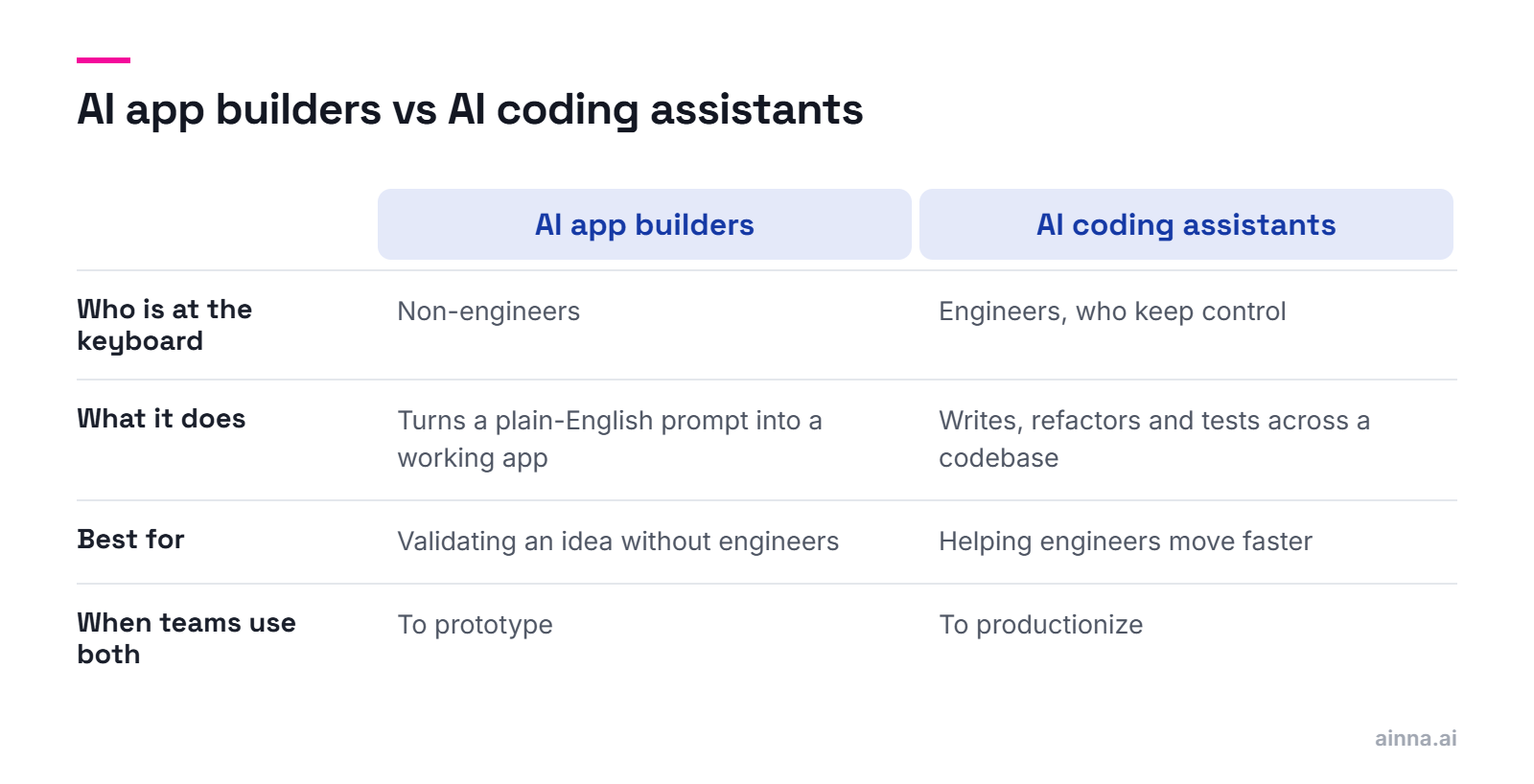
A new category of AI app builders, often called 'vibe coding,' turns a plain-English description into a working, deployable web app in minutes. This is the single biggest change to the Build layer in years: it collapses the distance between an idea and something a user can click, and it lets a non-engineer produce a credible prototype. The catch is the technical cliff - these tools fly through standard patterns and stall on unusual custom logic.

  • Lovable - the most mature full-stack builder; generates production-ready React and TypeScript with a database, authentication, and GitHub sync, so non-technical founders can ship a real MVP
  • Bolt.new - by StackBlitz; runs a full-stack app in the browser with broad framework support, favored when you want more technical flexibility
  • v0 - by Vercel; the strongest at polished React and Next.js interfaces, and the natural pick if you are already in the Vercel ecosystem
  • Replit - pairs its AI Agent with a complete cloud development environment, hosting, and a database, and reaches further than most toward native mobile
  • Even design tools are moving in: Figma Make turns a prompt into an editable design, blurring the line between designing and building
Key Takeaway

Use these to validate fast: a working prototype beats a slide every time. Treat the output as a starting point, not a finished product - validate the idea, then hand a clean codebase to engineering when it has to scale, harden, or meet security and compliance needs.

What about AI coding tools if we already have engineers?

If you have engineers, the leverage comes from AI coding assistants that work inside a real development environment rather than generating throwaway apps. They handle the routine parts of coding - writing, refactoring, and testing across a codebase - while developers keep control. This is where most professional software teams have already landed.

  • Cursor - by Anysphere; an AI-native editor built on a Visual Studio Code base that has become the default for many professional developers, with agents that edit across many files
  • GitHub Copilot - the incumbent; AI completions and chat that live inside the editors and GitHub workflow teams already use
  • Windsurf - an agentic editor with broad plugin support across many IDEs, now part of Cognition, the team behind the Devin coding agent
  • Claude Code - a terminal-first agentic coding tool, a different paradigm for developers who live on the command line
Key Takeaway

The distinction is who is at the keyboard: app builders are for validating an idea without engineers, coding assistants are for helping engineers move faster. Many teams use both - a builder to prototype, an assistant to productionize.

What's the fastest way to run a validation survey?

Surveys are the easiest evidence to collect and the weakest to trust. These tools are close to commodities, so the real differences come down to completion rate and where they integrate, and you should not over-think the choice. Use them to quantify a question you already understand, not to discover what the question is.

  • Typeform - conversational, one-question-at-a-time forms with high completion rates
  • SurveyMonkey - a long-standing survey platform for feedback and market questions at scale
  • Microsoft Forms - simple surveys and quizzes integrated with Microsoft 365
  • Google Forms - free, simple forms integrated with Google Workspace
  • Jotform - a flexible form builder with many templates and integrations
Key Takeaway

Surveys tell you what people say. To learn what they do, pair them with the research and testing tools below, and ground both in a clear MVP hypothesis. For enterprise-scale surveys and experience management, Qualtrics is the heavyweight, though it is overkill for early validation.

Which user testing tool should we use to validate a prototype?

User research and testing tools reveal how people actually behave, which is far more reliable than what they say in a survey. The category combines moderated and unmoderated testing, behavioral analytics, and research repositories, and it consolidated when UserTesting absorbed UserZoom in 2023.

  • UserTesting - a human-insight platform for video-based testing; it absorbed UserZoom in 2023, combining moderated and unmoderated research
  • Maze - rapid unmoderated testing that turns prototypes and surveys into quantitative research
  • Dovetail - a research repository for storing, tagging, and analyzing qualitative insights across a team
  • Hotjar - heatmaps, session recordings, and on-site surveys that show how people use a live product
  • Optimal Workshop - information-architecture research, including card sorting and tree testing
  • User Interviews - fast recruiting and scheduling of research participants
  • Suzy - a consumer-insights platform for quick quantitative and qualitative research with vetted audiences
Key Takeaway

Match the tool to the question: prototypes to Maze, live behavior to Hotjar, deep qualitative work to Dovetail. All of it feeds product discovery.

Did you know? Ainna generates complete, branded pitch decks — 50+ slides with market analysis, competitive positioning, and contextual AI-generated visuals — in 60 seconds. Generate your deck

Justified, well-intended critique is what true innovators should be looking for.

Which product management tool fits our roadmap?

Portfolio management and roadmapping keep innovation honest by forcing prioritization and balancing risk across initiatives. Used well, these tools connect innovation effort to active product development, making it visible and quantifiable instead of a set of scattered lists.

  • Aha! - the heavyweight for roadmapping and strategy, best when leadership needs a structured portfolio view across many initiatives
  • Productboard - built around turning customer feedback into prioritized roadmaps, so it suits feedback-heavy product organizations
  • Jira Product Discovery - the obvious pick for teams already delivering in Jira who want discovery to sit beside execution
  • airfocus - modular and lighter-weight, useful when you want flexible prioritization scoring without committing to a heavy system
Key Takeaway

These tools are where strategy meets execution. For the thinking behind them, see our guides to the product roadmap and competitive analysis.

How do we research the market and patents before building?

Market and patent intelligence tools help you read the landscape before you commit: who holds the relevant patents, what competitors are doing, and how big the opportunity is. They turn the vague question 'is this a good market' into evidence.

  • Patsnap - connected innovation intelligence for patent search, analytics, and technology landscaping
  • Google Patents - a free search engine across patents and scholarly literature worldwide
  • CB Insights - market intelligence tracking startups, funding, and emerging technology trends
  • Crunchbase - a database of companies, funding, and investors for market and competitor research
  • Statista - a statistics and market-data portal aggregating figures across industries
Key Takeaway

Use these to size and pressure-test an opportunity. They pair directly with market sizing and competitive analysis.

How is AI changing the way we innovate?

AI has crossed a line in the innovation stack: it has moved from assisting with discrete tasks to participating in the work itself. As we describe in Innovation Mode 2.0, AI agents - autonomous software components that perceive their environment, make decisions, and act toward a goal - are beginning to take over parts of the discovery process, acting as ideator, evaluator, and orchestrator.

  • Until recently, AI in the stack meant productivity: faster research, drafting, and summarizing
  • Agentic AI changes the role: software that ideates, assesses, and orchestrates with limited human oversight
  • The layers that defined the stack - capture, design, test, manage - are commoditizing
  • The durable advantage moves upstream, to how fast a team frames and validates opportunities
  • This is the shift to what we call the autonomous, AI-driven Innovation Mode in Chapter 6 of the book
Key Takeaway

The practical takeaway: spend less energy optimizing the commoditized middle of the stack, and more on the AI layer that is reshaping the front-end of innovation.

Can I just use ChatGPT or Claude for innovation work?

General-purpose AI assistants are excellent accelerators for the everyday work of innovation: research, ideation, drafting, and analysis. They are a genuine upgrade to productivity, but they are not purpose-built for innovation workflows, so they have real limits when it comes to structured opportunity discovery.

  • ChatGPT - a general-purpose assistant useful for research, ideation, and drafting
  • Claude - a general-purpose assistant strong at long-form reasoning, analysis, and writing
  • Gemini - Google's assistant, integrated across Google Workspace
  • Microsoft Copilot - Microsoft's assistant embedded across Microsoft 365
  • Perplexity - an answer engine that combines search with cited, synthesized responses for fast research
  • Their limits: no persistent innovation knowledge base, no shared opportunity scoring, and no awareness of your innovation agenda across sessions
Key Takeaway

Use them as a strong general layer. What they do not do is maintain your organization's accumulated innovation knowledge or run discovery as a continuous process, which is the gap purpose-built tools fill.

How can AI help us find better opportunities?

AI-powered opportunity discovery is the use of AI to accelerate the front-end of innovation: framing problems, identifying and scoring opportunities, and producing the documentation needed to move them forward. In our Innovation Mode methodology this rests on two ideas - the Innovation Graph and a set of AI innovation roles that ideate, evaluate, and orchestrate.

  • The front-end of innovation - problem framing, opportunity identification, and initial validation - has always been the slowest, most manual part
  • The Innovation Graph, as we define it in Innovation Mode 2.0, is an AI-powered network of innovation knowledge, ideas, and opportunities - a living repository the whole organization draws on
  • AI fills new roles on top of it: an AI ideator that generates ideas in context, an AI evaluator that scores them, and an AI orchestrator that runs discovery continuously
  • Together these turn discovery into an 'always-on' process rather than a periodic workshop
  • The output is not a longer idea list but framed, scored opportunities ready for a decision
Key Takeaway

This is the part of the stack worth the most attention now. For how it connects to the documents you actually ship, see the PRD, pitch deck, and product discovery guides.

Where does Ainna fit in our innovation stack?

Ainna occupies a layer of its own: AI-powered opportunity discovery. Where the rest of the stack helps you collaborate, design, test, and manage, Ainna addresses the front-end - turning a rough idea or problem into a framed, validated opportunity. Its tagline captures the shift this whole guide describes: 'Ideas in. Opportunities out.'

  • Ainna does not just offer a faster path to opportunities; it offers new methods, paths, and a different interaction model for discovering them
  • Unlike a general-purpose assistant, it understands innovation frameworks and asks the right clarifying questions rather than simply answering a prompt
  • Its core workflow turns a single idea or problem statement into decision-ready documentation: a PRD, a pitch deck, and a one-pager
  • At enterprise scale, it builds the Innovation Graph - the AI-powered network of innovation knowledge, ideas, and opportunities we describe in Innovation Mode 2.0 - so knowledge accumulates and stays usable across the organization over time
  • Also in the enterprise tier, it powers an autonomous, agentic innovation function: AI acting as ideator, evaluator, and orchestrator, the always-on model we detail in Chapter 6 of the book
Key Takeaway

This is why Ainna sits in its own layer rather than competing inside an existing one: it is the part of the stack built specifically for the front-end of innovation. See what it generates in the PRD, pitch deck, and one-pager guides.

Did you know? Ainna never retains your conversations or ideas for AI training. Hard deletion on demand. Your half-formed thinking stays yours — privacy enables honest exploration. Learn about privacy

How do we put together an innovation stack from scratch?

Build the stack layer by layer, choosing the fewest tools that remove the most friction. Start from the workflow and your innovation maturity, not from a feature comparison, and treat integration as a first-order concern - a tool that does not connect to your existing systems creates more overhead than it saves.

  • Work through the five layers of the stack and pick one or two tools per layer, no more
  • Anchor the choice to your innovation maturity - basic tools suffice early; orchestration matters at scale
  • Prioritize tools that integrate with what you already run
  • Decide where AI sits: a general assistant for everyday work, a purpose-built layer for opportunity discovery
  • Use our Innovation Toolkit to frame the decision with templates rather than guesswork
Key Takeaway

A coherent stack beats a complete one. Every tool you add should earn its place by removing more friction than it introduces.

What does a great innovation stack look like for a small team?

A great innovation stack for a small team is lean by design: one tool per essential layer, plus the AI layer, and nothing else. The goal is to ship and learn, not to assemble enterprise tooling you will not use. Done right, a five-tool stack outperforms a twenty-tool one because nothing sits idle and everything connects.

  • One collaboration tool for thinking together - a whiteboard or your existing chat
  • One design or AI prototyping tool to make ideas tangible fast
  • One feedback tool to test demand
  • A general-purpose AI assistant for everyday research and drafting
  • An opportunity-discovery layer to turn ideas into framed, validated cases
  • Skip portfolio management and heavy market intelligence until you have a portfolio to manage
Key Takeaway

Resist tool sprawl early. A startup wins on speed of learning, and every extra tool is a tax on that speed.

What mistakes should we avoid when picking innovation tools?

The most common mistake is buying tools to fix what is really a culture or leadership problem. The others follow from it: tool sprawl, optimizing the commoditized middle of the stack while ignoring the front-end, and treating tools as a substitute for the judgment that decides what is worth building.

  • Buying software to manufacture an innovation culture that does not yet exist
  • Tool sprawl - too many overlapping tools, each used partially
  • Over-investing in the commoditizing middle layers while neglecting opportunity framing
  • Ignoring integration, so tools sit in isolation and create reporting overhead
  • Mistaking activity for progress - a busy stack is not the same as validated opportunities
Key Takeaway

Choose deliberately, integrate ruthlessly, and put your attention where the advantage now lives: the front-end of innovation. For the full methodology behind this guide, our book Innovation Mode 2.0 goes deep on the Innovation Graph and autonomous opportunity discovery, and readers can use code AINNA.AI for a reader discount.

Innovating versus empowering others to innovate are fundamentally different missions: the former requires domain expertise, while the latter needs primarily innovation methodology and leadership skills.

Most AI says yes.
Ainna says prove it.

The same methodology behind these guides — structured into the AI Innovation Agent that frames opportunities, challenges assumptions, and produces stakeholder-ready documents in minutes.

Put Your Idea to the Test Free to explore · No credit card
Ideas in →
Opportunities out.