Foundational Concepts

Understanding AI, machine learning, and how they relate to product development.

AI engineering is the discipline of building reliable, scalable systems that use artificial intelligence to solve real problems. It combines machine learning expertise with software engineering practices to create AI-powered products that work consistently in production—not just in research demos.

  • Bridges the gap between AI research and production-ready products
  • Combines machine learning, software engineering, and DevOps practices
  • Focuses on reliability, scalability, and maintainability—not just accuracy
  • Includes selecting models, building data pipelines, and deploying AI systems
  • Requires understanding both AI capabilities and product requirements
  • Increasingly important as AI becomes embedded in everyday products

AI engineering is what turns impressive AI demos into products people can actually use. It's less about inventing new algorithms and more about making AI work reliably at scale.
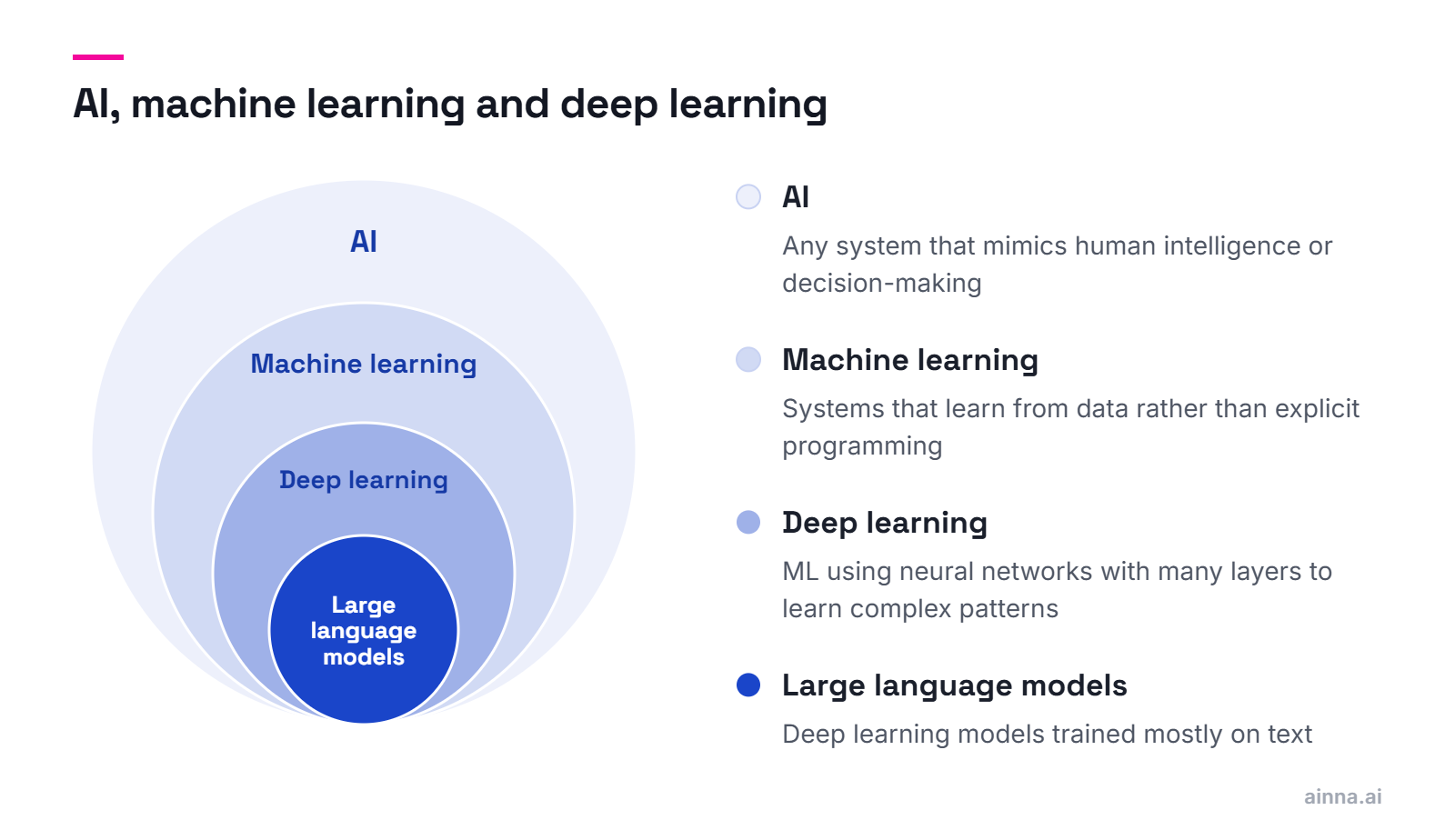
Think of them as nested circles: AI is the broadest concept (machines that mimic intelligence), machine learning is a subset (systems that learn from data), and deep learning is a further subset (learning using neural networks with many layers). Most modern AI products use deep learning.

  • AI (Artificial Intelligence) — Any system that mimics human intelligence or decision-making
  • Machine Learning (ML) — Systems that improve through experience rather than explicit programming
  • Deep Learning — ML using neural networks with multiple layers to learn complex patterns
  • Most 'AI' products today are actually deep learning systems
  • LLMs like ChatGPT and Claude are deep learning models trained on text
  • The terms are often used interchangeably in marketing, but distinctions matter technically

For practical purposes: if someone says 'AI' in a product context, they usually mean machine learning. If they mention neural networks or transformers, that's deep learning.

Data scientists focus on extracting insights from data and building models; AI engineers focus on deploying those models into production systems that work reliably at scale. Data scientists ask 'what can we learn?'—AI engineers ask 'how do we ship this?'

  • Data Scientist — Analyzes data, builds models, focuses on accuracy and insights
  • AI/ML Engineer — Deploys models, builds pipelines, focuses on reliability and scale
  • Data scientists often work in notebooks; AI engineers work in production code
  • Data scientists optimize for model performance; AI engineers optimize for system performance
  • Many teams need both—or people who can do both
  • The lines are blurring as tools make deployment easier

A data scientist might build a model that's 95% accurate; an AI engineer makes sure that model responds in 200ms, handles 10,000 requests per second, and fails gracefully when it can't.

Because AI capabilities are now table stakes for many products, and the difference between a demo and a product is AI engineering. Understanding AI engineering helps product teams set realistic expectations, make better build-vs-buy decisions, and create products that use AI effectively.

  • AI features are increasingly expected by users across all product categories
  • Poor AI engineering leads to unreliable, slow, or expensive products
  • Understanding capabilities helps set realistic timelines and expectations
  • Enables better decisions about building custom AI vs. using existing APIs
  • Helps identify where AI adds real value vs. where it's just hype
  • Critical for product leaders evaluating AI opportunities

You don't need to become an AI engineer, but understanding the basics helps you lead AI-powered product development effectively and avoid common pitfalls.

AI Models Explained

Understanding different types of AI models and when to use them.

LLMs are AI models trained on massive amounts of text that can understand and generate human language. They power tools like ChatGPT, Claude, and Gemini. They're 'large' because they have billions of parameters and were trained on most of the internet's text.

  • Trained on billions of words from books, websites, and documents
  • Can understand context, follow instructions, and generate coherent text
  • Examples: GPT-4, Claude, Gemini, Llama, Mistral
  • Good at: writing, summarizing, coding, analysis, conversation, reasoning
  • Limitations: can hallucinate facts, knowledge cutoffs, no real-time information
  • Can be accessed via APIs (OpenAI, Anthropic) or run locally (Llama, Mistral)

LLMs are the foundation of most AI products being built today. Understanding their capabilities and limitations is essential for anyone building AI-powered features.

AI models are specialized for different tasks: computer vision for images, speech models for audio, recommendation systems for personalization, and more. LLMs handle language, but many AI products combine multiple model types.

  • Computer Vision — Image classification, object detection, facial recognition
  • Speech Models — Speech-to-text, text-to-speech, voice cloning
  • Recommendation Systems — Netflix suggestions, Amazon product recommendations
  • Generative Image Models — DALL-E, Midjourney, Stable Diffusion
  • Time Series Models — Forecasting, anomaly detection, predictive maintenance
  • Multimodal Models — Combine text, image, audio (GPT-4V, Gemini)

Choose models based on your problem, not what's trending. LLMs are powerful but not always the right tool—sometimes a simple classifier outperforms a billion-parameter model.

Parameters are the learned values that make up a model's 'knowledge.' A 7B model has 7 billion parameters; a 70B model has 70 billion. Generally, larger models are more capable but slower and more expensive to run. The relationship isn't linear—a 70B model isn't 10x smarter than 7B.

  • Parameters are the numbers the model learned during training
  • More parameters generally means more capability and nuance
  • Also means more compute, memory, and cost to run
  • 7B models can run on good consumer hardware; 70B+ needs serious infrastructure
  • Smaller models can outperform larger ones on specific tasks with fine-tuning
  • The 'right' size depends on your task, latency needs, and budget

Don't assume bigger is always better. A well-tuned 7B model often beats a generic 70B model for specific tasks—at a fraction of the cost.

Closed models (GPT-4, Claude) are accessed only via APIs—you can't see or modify the model itself. Open models (Llama, Mistral) release weights you can download, run, and modify. Open models offer more control and privacy; closed models are often more capable and easier to use.

  • Closed/Proprietary — Access via API only (OpenAI, Anthropic, Google)
  • Open Weights — Model files released for download and local use (Meta Llama, Mistral)
  • Open Source — Weights plus training code and data (rare for frontier models)
  • Closed models: easier to use, often more capable, data goes to provider
  • Open models: full control, privacy, can fine-tune, but more complex to deploy
  • Many products use closed APIs for convenience, open models for sensitive data

The choice depends on your needs: closed models for quick development and best capabilities; open models for data privacy, customization, and avoiding vendor lock-in.

Fine-tuning takes a pre-trained model and trains it further on your specific data to improve performance for your use case. It's like hiring a general expert and then training them on your company's specifics. You need it when prompting alone doesn't get the quality or consistency you need.

  • Starts with a pre-trained model (the 'base' knowledge)
  • Trains further on your data to specialize it for your task
  • Can improve quality, consistency, and reduce prompt complexity
  • Requires representative training data—hundreds to thousands of examples
  • More expensive and complex than just using prompts
  • Consider fine-tuning when: specific style needed, domain expertise required, or prompts get unwieldy

Start with prompting. Only fine-tune when you've exhausted prompt engineering and still need better results. Fine-tuning is powerful but adds complexity and cost.

Tools and Technologies

The practical tools and platforms used in AI engineering.

A modern AI stack typically includes: Python for development, frameworks like PyTorch or TensorFlow, cloud platforms for compute (AWS, Azure, GCP), vector databases for retrieval, and orchestration tools for complex workflows. Most teams also use managed APIs for foundation models.

  • Language — Python dominates; JavaScript/TypeScript for web integration
  • ML Frameworks — PyTorch (research favorite), TensorFlow (production), JAX (Google)
  • LLM APIs — OpenAI, Anthropic, Google, Cohere, or self-hosted
  • Vector Databases — Pinecone, Weaviate, Chroma, Qdrant for similarity search
  • Orchestration — LangChain, LlamaIndex for complex LLM workflows
  • Cloud — AWS SageMaker, Azure ML, Google Vertex AI for managed infrastructure

You don't need everything—start simple. Many successful AI products use just an LLM API, a vector database, and straightforward Python code.

Prompt engineering is the art of crafting inputs to AI models to get better outputs. It's how you 'program' LLMs without writing code. Good prompts can dramatically improve quality, consistency, and reliability—often more than switching to a larger model.

  • The prompt is your interface to the model—garbage in, garbage out
  • Techniques include: clear instructions, examples, role-playing, chain-of-thought
  • System prompts set behavior; user prompts provide specific requests
  • Small prompt changes can cause large output differences
  • Iterative testing and refinement is essential
  • Often the highest-leverage work in AI product development

Before fine-tuning or switching models, invest in prompt engineering. It's faster, cheaper, and often more effective than other approaches.

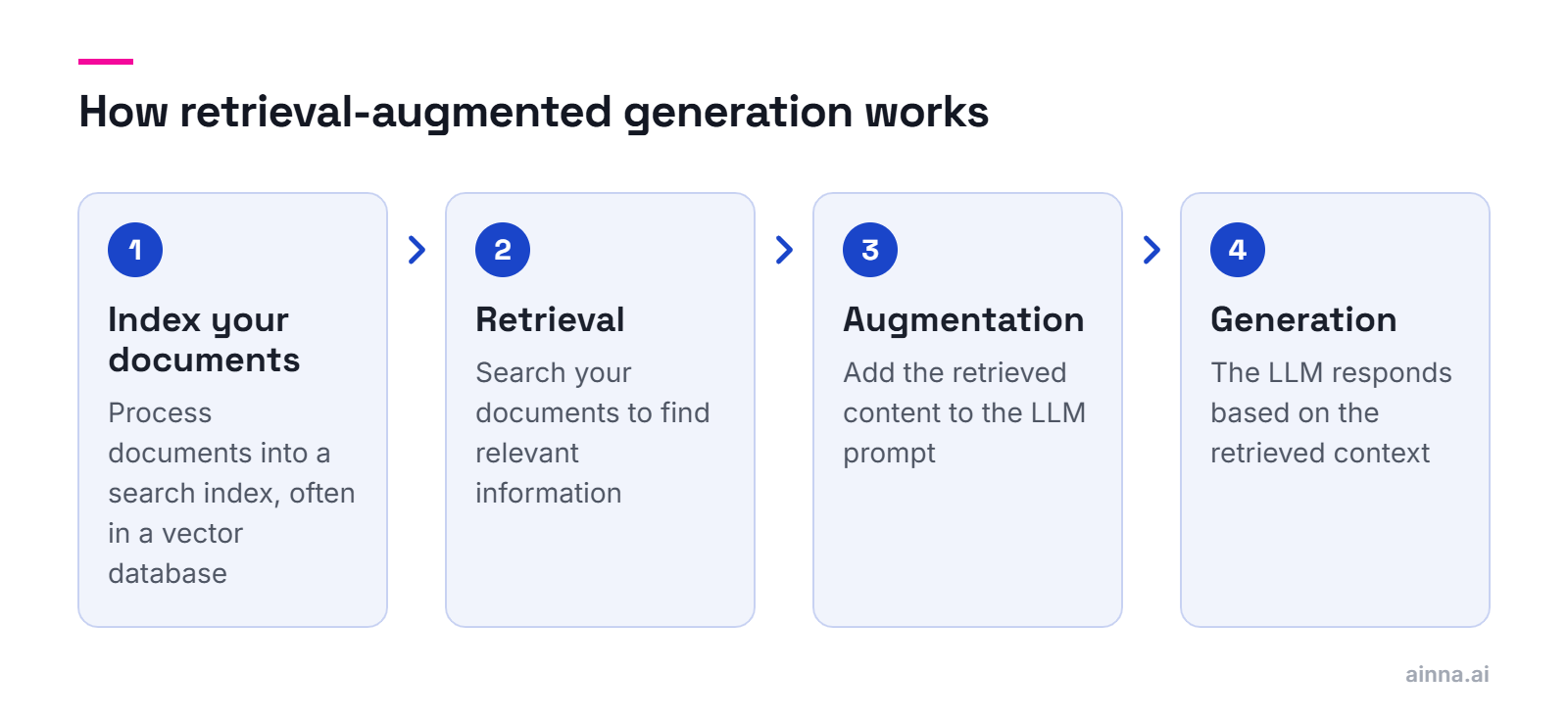
RAG combines LLMs with search to ground responses in your actual data. Instead of relying only on what the model learned during training, RAG retrieves relevant documents and includes them in the prompt—giving the model current, accurate information to work with.

  • Retrieval — Search your documents to find relevant information
  • Augmentation — Add retrieved content to the LLM prompt
  • Generation — LLM creates response based on retrieved context
  • Solves: knowledge cutoffs, hallucinations, domain-specific information
  • Requires: document processing, embeddings, vector database, retrieval logic
  • Common pattern for chatbots, search, and knowledge-base applications

RAG is how you make LLMs useful for your specific data without fine-tuning. It's the most common architecture for enterprise AI applications.

Vector databases store data as numerical vectors (embeddings) that capture semantic meaning, enabling similarity search. They answer questions like 'find documents similar to this one' rather than exact keyword matches—essential for RAG, recommendations, and semantic search.

  • Traditional databases match exact values; vector databases find similar meanings
  • Embeddings convert text/images into numerical vectors capturing semantics
  • Enable 'fuzzy' searches: 'documents about dogs' finds 'puppy' and 'canine'
  • Popular options: Pinecone (managed), Weaviate, Chroma, Qdrant, pgvector
  • Critical for RAG systems, semantic search, and recommendation engines
  • Often combined with traditional databases for hybrid search

If you're building with LLMs and your own data, you'll likely need a vector database. They're the memory that makes RAG work.

AI agents are systems where an LLM can take actions, not just generate text. They can browse the web, execute code, call APIs, and use tools to accomplish tasks. Think of them as LLMs with hands—they can do things, not just say things.

  • Traditional LLM: takes input, produces text output
  • Agent: takes goal, plans steps, uses tools, executes actions, observes results
  • Tools might include: web search, code execution, API calls, file operations
  • Requires careful design to avoid runaway behavior or errors
  • Examples: coding assistants, research agents, automation workflows
  • Still emerging—reliability and control are active challenges

Agents represent the next frontier in AI applications—moving from assistants that help you do things to systems that do things for you. Ainna itself is an AI agent that generates complete documentation packages.

Development Process

How AI products are built, tested, and deployed.

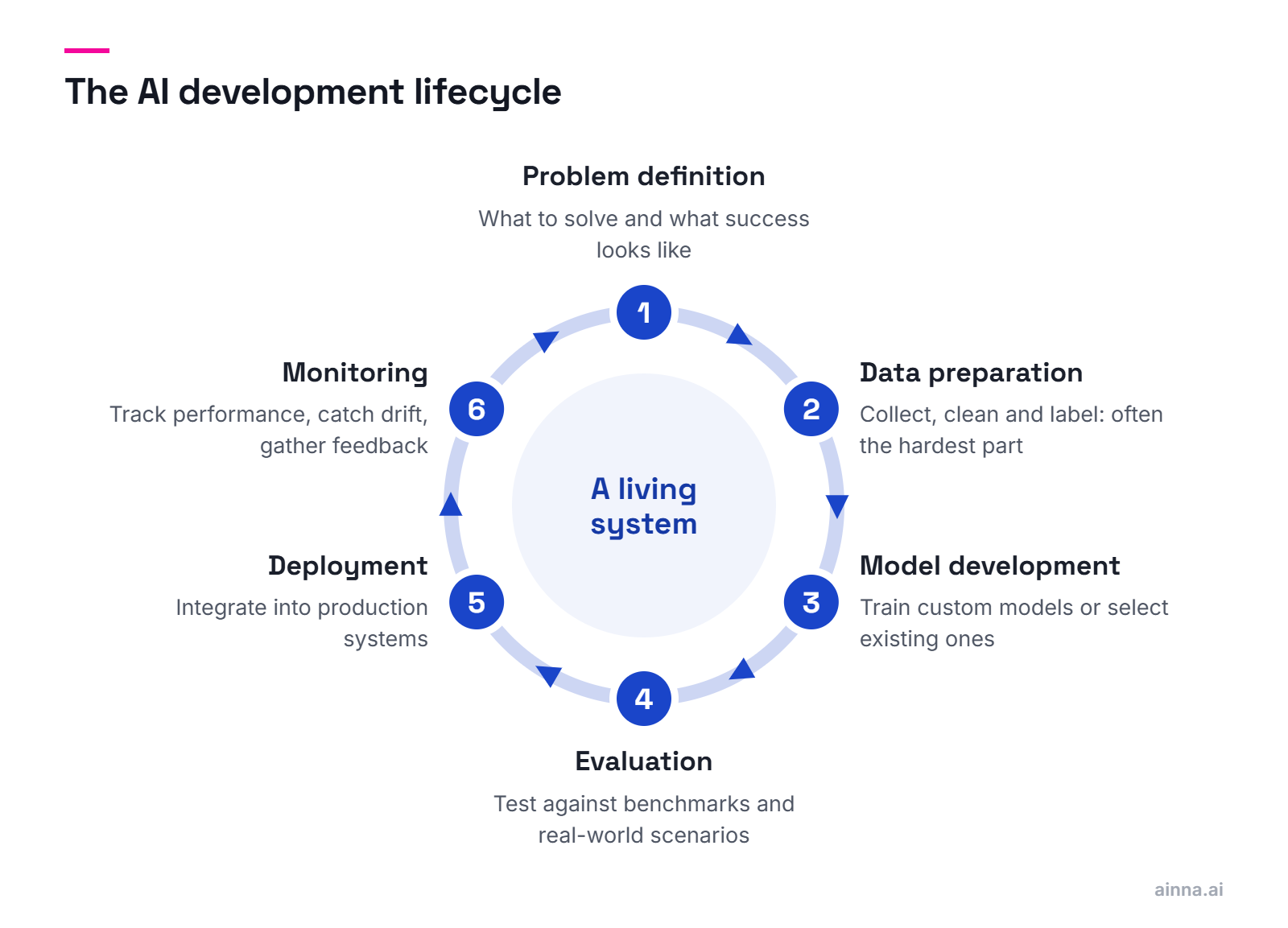
AI development follows a cycle: define the problem, collect/prepare data, develop/select models, evaluate performance, deploy to production, monitor and iterate. Unlike traditional software, AI products require continuous evaluation because model behavior can drift and degrade.

  • Problem Definition — What are you trying to solve? What does success look like?
  • Data Preparation — Collect, clean, label data (often the hardest part)
  • Model Development — Train custom models or select/configure existing ones
  • Evaluation — Test against benchmarks and real-world scenarios
  • Deployment — Integrate into production systems with proper infrastructure
  • Monitoring — Track performance, catch degradation, gather feedback for iteration

The cycle never really ends. AI products require ongoing monitoring and improvement—they're living systems, not shipped-and-done software.

MLOps (Machine Learning Operations) applies DevOps principles to machine learning—automating the pipeline from model development to production deployment and monitoring. It's how teams ship and maintain AI systems reliably, not just build impressive demos.

  • Version control for data, models, and experiments—not just code
  • Automated training pipelines that reproduce results consistently
  • Model registries to track which models are deployed where
  • Continuous integration/deployment adapted for ML
  • Production monitoring for model performance, drift, and errors
  • Tools: MLflow, Kubeflow, Weights & Biases, DVC, cloud-native options

MLOps is what separates hobby projects from production AI. If you can't reliably retrain, deploy, and monitor your models, you don't have a product.

AI evaluation combines automated metrics with human judgment. Automated evals test specific capabilities at scale; human evals assess subjective quality and edge cases. Good evaluation requires clear success criteria defined upfront—what does 'good enough' mean for your use case?

  • Define success criteria before building—what quality level is acceptable?
  • Automated metrics: accuracy, latency, cost per request, error rates
  • Human evaluation: quality ratings, preference comparisons, error analysis
  • Test datasets should represent real-world usage, including edge cases
  • A/B testing in production to measure actual user impact
  • Continuous monitoring—performance can degrade over time

Evaluation is where many AI projects fail. Without clear metrics and rigorous testing, you're guessing whether your AI actually works.

Default to APIs unless you have strong reasons to build. Build custom when: you need capabilities APIs don't offer, data privacy prevents sending data externally, you need fine-grained control, or AI is your core differentiator. APIs win on speed, cost, and maintenance for most use cases.

  • Use APIs when: standard capabilities suffice, speed to market matters, team lacks ML expertise
  • Build custom when: unique capabilities needed, sensitive data involved, AI is core IP
  • APIs: faster to start, managed infrastructure, but less control and vendor dependency
  • Custom: full control, data stays internal, but expensive and requires expertise
  • Hybrid approach: APIs for most features, custom models for differentiators
  • Consider: what happens if the API changes pricing or capabilities?

Most products should start with APIs and only build custom when there's a clear, compelling reason. The best AI is the AI you ship, not the AI you're still building.

Practical Considerations

Costs, ethics, and real-world challenges of AI engineering.

Costs vary wildly—from nearly free to millions per year. API costs are typically per-token (fractions of a cent per request); self-hosted requires GPU infrastructure ($1-10+/hour). The biggest cost drivers are: model size, request volume, and whether you're training or just inferencing.

  • API pricing: typically $0.001-0.06 per 1K tokens depending on model
  • A typical chat interaction might cost $0.01-0.10
  • High-volume applications can see $10K-100K+ monthly API bills
  • Self-hosting requires GPUs: $1-10/hour for inference, much more for training
  • Hidden costs: data preparation, evaluation, monitoring, engineering time
  • Optimization opportunities: caching, smaller models, prompt compression

Start with API pricing calculators and realistic volume estimates. Many teams are surprised by costs at scale—build cost monitoring from day one.

Hallucinations are when AI models confidently generate false information—invented facts, fake citations, or plausible-sounding nonsense. You can't eliminate them entirely, but you can reduce them through RAG, careful prompting, output validation, and designing systems that acknowledge uncertainty.

  • Hallucinations happen because models predict plausible text, not verified facts
  • More common when asking about: obscure topics, recent events, specific numbers
  • Mitigation: RAG to ground responses in real data
  • Mitigation: prompts that encourage 'I don't know' responses
  • Mitigation: output validation and fact-checking pipelines
  • Design: show confidence levels, cite sources, allow user verification

Don't deploy AI where hallucinations could cause serious harm without human review. Design your product to make verification easy and uncertainty visible.

Responsible AI engineering considers: bias and fairness (does it work equally well for everyone?), privacy (what data are you collecting and storing?), transparency (can users understand and appeal decisions?), and safety (what happens when it fails?). These aren't nice-to-haves—they're essential for sustainable AI products.

  • Bias — Models can perpetuate or amplify biases in training data
  • Privacy — LLMs may memorize and leak training data; consider data handling
  • Transparency — Users should know when they're interacting with AI
  • Accountability — Who's responsible when AI makes mistakes?
  • Safety — What guardrails prevent harmful outputs or actions?
  • Consent — Are users informed about how their data is used?

Ethics isn't a checkbox—it's an ongoing practice. Build diverse teams, test with diverse users, create feedback channels, and be willing to not ship features that cause harm.

AI systems have unique attack surfaces: prompt injection (malicious inputs that hijack model behavior), data poisoning (corrupting training data), model theft (extracting model capabilities), and privacy leaks (models revealing training data). Traditional security plus AI-specific defenses are both required.

  • Prompt injection — Malicious inputs that override system instructions
  • Data poisoning — Adversarial data that corrupts model behavior
  • Model extraction — Queries designed to steal model capabilities
  • Privacy leaks — Models revealing sensitive training data
  • Denial of service — Expensive queries that drain compute budgets
  • Defense: input validation, output filtering, rate limiting, monitoring

AI security is an evolving field. Stay current on attacks and defenses, assume adversarial users exist, and design systems with defense in depth.

AI performance optimization involves: model selection (smaller models are faster), infrastructure (GPU types, geographic distribution), caching (store common responses), streaming (show partial results), and async processing (don't block on AI calls). Users tolerate some latency for AI, but not infinite waits.

  • Model selection — Smaller models are faster; use the smallest that meets quality needs
  • Caching — Store responses for common queries; semantic caching for similar queries
  • Streaming — Return partial responses as they generate for perceived speed
  • Batching — Process multiple requests together when latency isn't critical
  • Infrastructure — GPU type, region placement, autoscaling
  • Async design — Don't block users waiting for AI; show progress, allow interruption

Optimize for perceived performance, not just raw latency. Streaming responses and clear progress indicators make AI feel faster even when it isn't.

Getting Started

Practical guidance for teams beginning their AI journey.

Start small, use existing APIs, and focus on a real problem. Pick a use case where AI failure is acceptable (not life-critical), success is measurable, and you can iterate quickly. Build the simplest thing that could work, get it in front of users, and improve from there.

  • Choose a real problem, not a 'we should use AI' solution looking for a problem
  • Start with APIs—don't build infrastructure before validating the use case
  • Define success metrics before building—how will you know if it works?
  • Build a <a href='/resources/faq/mvp-faq'>minimal viable version</a> and test with real users quickly
  • Plan for iteration—your first version won't be perfect
  • Consider: what's the fallback when AI fails?

The biggest mistake is over-engineering before validation. Ship something simple, learn from real usage, and add sophistication where it matters.

For API-based AI: strong software engineering plus prompt engineering skills. For custom models: add ML/data science expertise. For production systems: add MLOps capabilities. Most teams can start with existing engineers learning AI tools—you don't need a PhD to build useful AI products.

  • Essential: Python programming, API integration, basic ML concepts
  • Valuable: prompt engineering, evaluation design, system design for AI
  • For custom models: ML/data science expertise, training infrastructure knowledge
  • For production: MLOps, monitoring, scaling, security considerations
  • Existing engineers can learn AI tools; AI expertise alone isn't enough
  • Product and design skills matter as much as technical AI skills

The best AI teams combine AI expertise with strong product sense. Technical capability without product leadership produces impressive demos that don't solve real problems.

Start with official documentation (OpenAI, Anthropic), then hands-on courses (fast.ai, DeepLearning.AI), then build projects. The fastest learning comes from building real things—theory without practice doesn't stick. Join communities to stay current as the field moves fast.

  • Official docs: OpenAI, Anthropic, Hugging Face documentation
  • Courses: fast.ai (practical), DeepLearning.AI (foundational), Coursera ML specializations
  • Hands-on: Kaggle competitions, personal projects, contributing to open source
  • Communities: Hugging Face, Reddit r/MachineLearning, Discord servers, Twitter/X
  • Newsletters: The Batch (DeepLearning.AI), Import AI, Papers with Code
  • Stay current: AI moves fast; set aside time for continuous learning

Learning AI is a continuous journey, not a destination. The field changes monthly—build a habit of staying current while applying what you learn to real projects.