Prototyping Fundamentals

Core definitions and concepts that form the foundation of effective software prototyping.

A software prototype is an intentionally incomplete instance of a product—an early approximation of a concept or feature. Although prototypes may look realistic, they come with limited functionality and plenty of shortcuts behind the scenes.

  • Intentionally incomplete—only essential features are built, not the full product
  • Short lifecycle—becomes obsolete once decisions are made about the underlying concept
  • Fast and inexpensive—should take days, not months, to develop
  • Learning-focused—purpose is to validate ideas and capture insights before full development investment
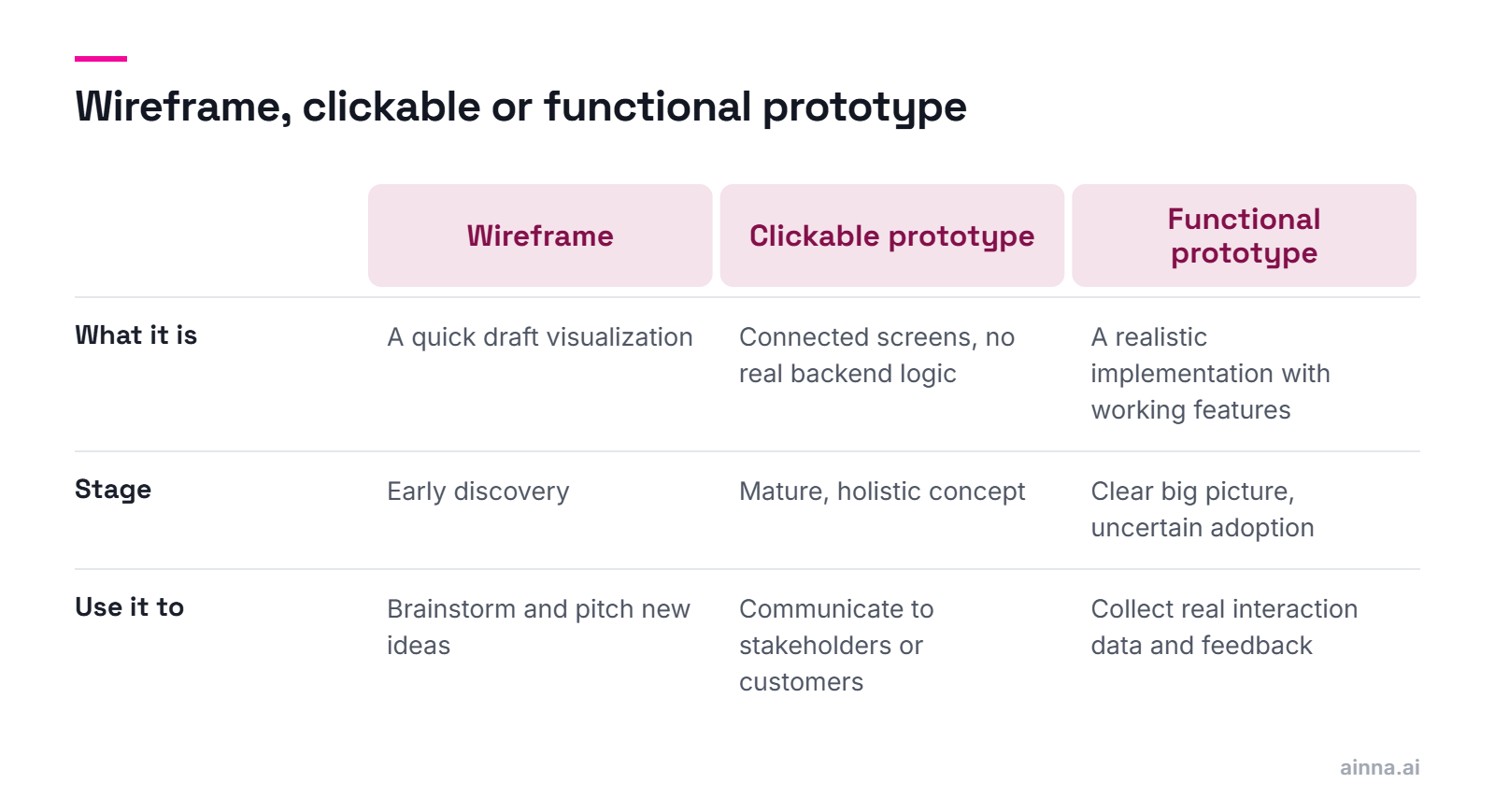
  • Multiple forms: wireframes, clickable prototypes (connected UIs mimicking flow), or functional prototypes (realistic interactive implementations)

The key distinction: prototypes are for learning, not shipping. They reduce risk by enabling early user feedback before committing to complex development.

A clickable prototype connects UI screens to demonstrate navigation and user flows without real functionality. A functional prototype is a realistic, interactive implementation with actual working features that supports real user interaction.

  • Clickable prototype: series of connected interfaces mimicking application flow
  • Clickable prototype: demonstrates core user journeys but no real backend logic
  • Functional prototype: approximates the envisioned product with sufficient working features
  • Functional prototype: enables collection of real interaction data and meaningful user feedback
  • Clickable is faster/cheaper; functional provides richer validation data

Choose clickable when you need to communicate vision and test flow. Choose functional when you need to validate that users will actually engage with novel features or technologies.

Use wireframes for early discovery and brainstorming. Use clickable prototypes to communicate mature concepts to stakeholders. Use functional prototypes when there's high uncertainty and significant implementation costs involved.

  • Wireframes: ideal for quick draft visualizations, brainstorming sessions, ideations, and pitching new ideas
  • Clickable prototypes: valuable when you have a mature, holistic view and need to communicate to broader stakeholders or potential customers
  • Functional prototypes: essential when there's sufficient clarity about the big picture but increased uncertainty about user adoption
  • Functional prototypes: justify the extra effort when implementation costs are significant and you need real interaction data
  • Match fidelity to uncertainty—higher stakes require higher fidelity validation

The decision framework: How much do you need to learn? How expensive would a wrong decision be? Higher uncertainty and higher stakes justify functional prototypes.

Exclude any standard, conventional, or non-essential features. Prototypes should not meet typical production-readiness requirements—they are throw-away implementations with short lifecycles.

  • Skip complex architectures for scalability and performance—these add no learning value
  • Avoid formal implementation patterns, clean code practices, and documentation
  • Don't build sophisticated data models or backend layers—use static JSON objects instead
  • Skip commenting, refactoring, and code organization—this is throw-away code
  • Exclude features that are well-understood and conventional—focus only on uncertain elements

Every hour spent on production-readiness is an hour not spent getting your prototype in front of users. Ruthlessly cut scope to the features that generate the most learning.

Extracting Value from Prototypes

How to maximize learning and ROI from your prototyping investment.

The purpose of a prototype is to help the product team learn and set the right focus. Prototypes validate concepts in a fast, inexpensive way before full development—reducing risk by identifying signals for improvement or pivots directly from real users.

  • Achieves clarity and alignment—people interact with a realistic approximation, creating shared understanding
  • Provides feedback channels—qualitative input from users plus quantitative interaction data through telemetry
  • Illuminates ambiguous concepts—some ideas are impossible to explain without hands-on demonstration
  • Tests user readiness—validates whether target personas will actually adopt novel technologies or features
  • Accelerates development—reduces unnecessary loops and wrong decisions by enabling early feedback

A prototype brings maximum value when the concept has high uncertainty. The risk that users aren't ready for a novel feature can be validated in days rather than discovered after months of development.

Prototypes answer questions about user engagement, feature fit, and concept feasibility—essentially, "Will this work?" before you commit to building it.

  • How will real users engage and interact with this product concept?
  • How will novel features fit into an existing user experience?
  • How would a complex concept look and feel in a particular form factor?
  • Are users ready and willing to adopt this new technology or interaction pattern?
  • What's the expected level of engagement, and how does it compare to alternatives?

Define your learning objectives before building. Every feature in your prototype should map to a specific question you need answered.

Prototype results—interaction data, performance measurements, structured and unstructured feedback—must be analyzed to recommend the next best action: park, pivot, iterate, expand testing, or progress to development.

  • Analyze all data types: telemetry, surveys, interviews, observed behaviors
  • Involve stakeholders in interpreting insights and making decisions about the concept's future
  • Possible outcomes: park the idea, pivot direction, build more thorough prototype, expand to broader audiences
  • Positive signals may justify progressing directly to the development pipeline
  • Document learnings—they inform future product decisions even if this specific concept doesn't advance

The prototype's value is realized in the decision it enables. Always have a clear framework for how different feedback scenarios map to different next actions.

Yes—and it's a double-edged sword. UX must be well-designed to accurately present the concept, but poor UX can generate negative feedback that reflects on the interface rather than the underlying idea being tested.

  • UX must present the concept, flow, and core interaction patterns precisely
  • Risk: negative feedback may reflect bad UX rather than a flawed concept
  • Mitigation: test multiple UX approaches, or use low-fidelity visualizations to neutralize UI influence
  • Clearly communicate the prototype's nature and purpose to users before testing
  • Context matters—consumer products need polished UX; internal tools can be rougher

Be explicit with testers: are you validating the concept or the interface? Design your prototype and testing approach to isolate the variable you're actually trying to measure.

Building Prototypes Fast

Techniques and best practices for accelerating prototype development without sacrificing learning value.

It depends on complexity and strategy, but most functional prototypes can be built in just a few days. The key is proper scope definition and a clear learning strategy—not over-engineering.

  • Range: from a couple of days to weeks or months, depending on complexity
  • Most software prototypes are feasible in a few days with the right approach
  • Critical success factor: properly scope the prototype—select only features that generate insights
  • Define your learning strategy: target audience, data to collect, how to generate insights
  • Have clear next-step scenarios before building—know what you'll do with different outcomes

If your prototype is taking months, you're probably building too much. Revisit scope ruthlessly—what's the minimum you need to learn what you need to learn?

Focus only on insight-generating features, use static data instead of real backends, leverage third-party resources and prototyping tools, make assumptions freely, and deliberately relax quality standards.

  • Don't waste resources on non-critical components—build only what generates learning
  • Use static data: model entities as JSON objects instead of building databases and backends
  • Leverage third-party resources: UI components, APIs, datasets, images, open-source code
  • Use prototyping tools: wizard-like platforms with templates and pre-built components
  • Make assumptions at every decision point—you're aiming for realistic experience, not production-ready systems
  • Reconsider quality: skip best practices, documentation, refactoring—this is throw-away code
  • Relax constraints: remove production-readiness requirements entirely

The Innovation Mode proposes the prototype factory—a specialized organizational entity that streamlines prototyping and validation as a service across the company, improving opportunity discovery bandwidth.

Sources:The Innovation ModePrototype Factory concept, Chapter 8

Cost varies based on team size, tools used, and concept complexity. However, the real question is: what's the cost of NOT prototyping and discovering problems after full development?

  • Variables: development team size and composition, tools and platforms, concept complexity
  • Low-code/no-code tools dramatically reduce cost for many prototype types
  • In-house vs agency: internal teams with reusable components are cheapest long-term
  • AI tools are reducing costs further—see AI prototyping section
  • Frame cost against risk: a $5K prototype that prevents a $500K failed feature is excellent ROI

The cheapest prototype is one built with reusable components by a team with prototyping muscle memory. Invest in building that capability.

Yes—with the right understanding and tools. You need clear objectives, product sense, sufficient UI/UX understanding, and access to modern visual design and low/no-code platforms.

  • Required: clear understanding of prototyping objectives—what you're trying to learn
  • Required: product sense—understanding architecture, feature prioritization, scope-setting
  • Required: sufficient UI/UX knowledge to create coherent user experiences
  • Required: access to visual design tools (Figma) and low/no-code platforms (Webflow, Wix, OutSystems)
  • AI tools are making this even more accessible—natural language to prototype is emerging

The barrier is shifting from "can you code?" to "can you think clearly about what needs to be validated?" Tools handle more of the implementation; humans must still define the right problem.

Prototyping Tools & Platforms

Overview of tools and platforms for different prototyping needs and skill levels.

Use existing resources and minimize setup time. For clickable prototypes, use design tools like Figma. For functional prototypes, platforms like Webflow, Wix, or low-code tools like OutSystems enable rapid implementation.

  • Clickable prototypes: Figma, Sketch, Adobe XD, InVision—connect screens with interactions
  • Functional web prototypes: Webflow, Wix, Framer—great building blocks for digital experiences
  • Sophisticated functional prototypes: OutSystems, Mendix, Retool—low/no-code with more power
  • Mobile prototypes: FlutterFlow, Adalo, Glide—app-specific rapid development
  • Readiness matters: teams should maintain reusable components, services, UI elements, datasets

The best tool is one your team can use quickly. Build organizational readiness with reusable components—this compounds over time.

Use Figma for design exploration and clickable prototypes where fidelity of interaction isn't critical. Use Webflow when you need functional, deployable prototypes with real interactions, forms, and CMS capabilities.

  • Figma: design-first, excellent for visual exploration, collaboration, and handoff to developers
  • Figma: clickable prototypes are fast but limited—no real forms, data, or backend logic
  • Webflow: produces real, deployable websites with animations, forms, and CMS
  • Webflow: steeper learning curve but output is production-usable, not just a mockup
  • Hybrid approach: design in Figma, build functional prototype in Webflow

Figma excels at exploring possibilities; Webflow excels at proving they work. Use both in sequence for complex products.

Low-code/no-code platforms dramatically accelerate functional prototype development, enabling non-developers to build sophisticated prototypes and developers to move 5-10x faster than traditional coding.

  • No-code (Webflow, Wix, Glide): visual builders, no programming required, limited customization
  • Low-code (OutSystems, Mendix, Retool): visual development with code extensibility for complex logic
  • Sweet spot: internal tools, CRUD applications, data dashboards, workflow automation
  • Limitations: highly custom UX, complex algorithms, and performance-critical applications may need traditional development
  • Emerging: AI-enhanced low-code platforms that generate components from descriptions

Low-code/no-code has matured significantly. For 80% of prototype use cases, these platforms are faster than traditional development. Reserve custom code for truly novel technical requirements.

Sources:Gartner Low-Code ReportMarket analysis and predictions

AI-Powered Prototyping

How artificial intelligence is transforming rapid prototyping—tools, techniques, trade-offs, and concerns.

AI is collapsing the time from idea to functional prototype from days to hours or even minutes. Natural language descriptions can now generate working code, UI components, and even complete applications.

  • Code generation: describe functionality in plain English, get working code (GPT-4, Claude, Copilot)
  • UI generation: describe interfaces, get component code or visual designs (v0, Galileo AI)
  • Full-stack generation: describe an app, get deployable prototypes (Bolt, Lovable, Replit Agent)
  • Design-to-code: upload sketches or wireframes, get implemented components
  • Iteration speed: modify prototypes through conversation rather than manual coding

The fundamental shift: prototyping is becoming a conversation rather than a construction project. This democratizes prototype creation while requiring new skills in prompt engineering and AI output refinement.

The landscape is evolving rapidly. Key categories: code assistants (Copilot, Cursor), UI generators (v0, Galileo), full-stack builders (Bolt, Lovable, Replit), and design tools with AI (Figma AI, Framer AI).

  • Code assistants: GitHub Copilot, Cursor, Codeium—autocomplete and code generation in your IDE
  • UI/Component generators: v0 (Vercel), Galileo AI—describe UI, get React/Tailwind code
  • Full-stack app builders: Bolt.new, Lovable, Replit Agent—describe app, get deployable prototype
  • Design tools: Figma AI features, Framer AI—generate layouts, copy, variations
  • Conversational development: Claude, GPT-4—generate code through dialogue, iterate via conversation

No single tool does everything well yet. Effective AI-assisted prototyping often combines multiple tools: ideate with ChatGPT/Claude, generate UI with v0, build full-stack with Bolt, refine in Cursor.

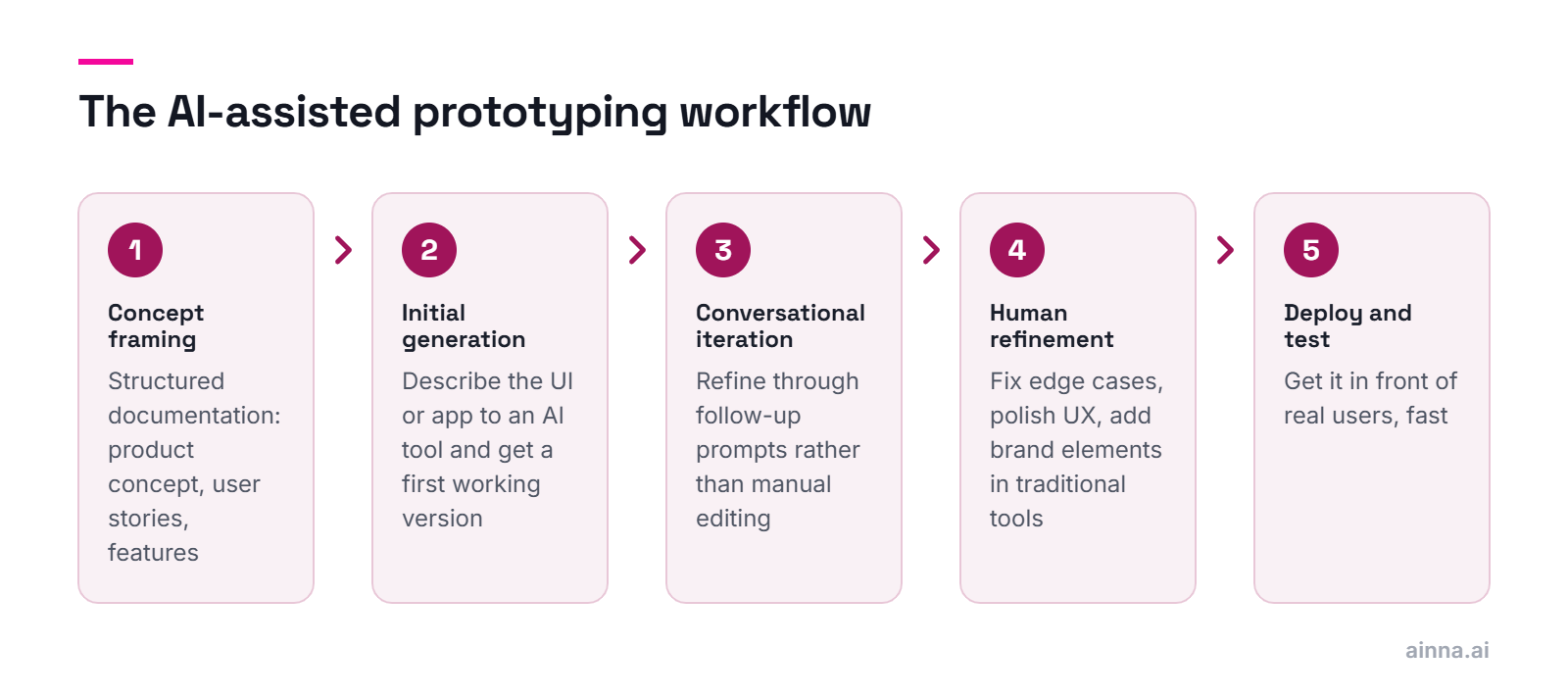
A modern AI-assisted workflow: (1) Frame the concept with AI conversation, (2) Generate initial UI/code, (3) Iterate through dialogue, (4) Refine in traditional tools, (5) Deploy and test with real users.

  • Step 1: Concept framing—use Claude/GPT to structure your idea, define user stories, outline features
  • Step 2: Initial generation—describe your UI/app to v0, Bolt, or similar; get first working version
  • Step 3: Conversational iteration—refine through follow-up prompts rather than manual editing
  • Step 4: Human refinement—fix edge cases, polish UX, add brand elements in traditional tools
  • Step 5: Deploy and test—use Vercel, Netlify, or built-in deployment to get in front of users fast

The human role shifts from "builder" to "director"—you're guiding AI outputs, making judgment calls, and ensuring the prototype serves its validation purpose. Prompt engineering becomes a core prototyping skill.

AI dramatically accelerates initial generation but introduces challenges: output quality varies, debugging AI code is different from debugging your own, and there's risk of over-reliance leading to skill atrophy.

  • Speed vs control: AI is fast but you have less fine-grained control over implementation details
  • Quality variance: AI output ranges from excellent to subtly broken—requires careful review
  • Debugging challenge: understanding and fixing AI-generated code you didn't write
  • Prompt dependency: results heavily depend on prompt quality—garbage in, garbage out
  • Skill atrophy risk: over-reliance may weaken fundamental development skills
  • Cost: API costs can add up for heavy usage, though declining rapidly

AI is a power tool, not a replacement for judgment. Use it to accelerate execution, but maintain the skills to understand, evaluate, and fix what it produces.

Key concerns include intellectual property ambiguity, security vulnerabilities in generated code, dependency on external services, and the risk of creating technical debt that's hard to unwind.

  • IP concerns: AI trained on public code—unclear licensing implications for generated output
  • Security risks: AI may generate code with vulnerabilities, especially for auth, data handling
  • Vendor dependency: reliance on external AI services that may change, degrade, or disappear
  • Technical debt: AI-generated code may work but be poorly structured for future development
  • Hallucination risk: AI may confidently generate code that looks right but doesn't work
  • Context limitations: AI may not understand your specific business logic or constraints

For prototypes specifically, many of these concerns are less critical—you're building throw-away code anyway. But if a prototype evolves into production, these issues compound. Be intentional about the transition.

Sources:GitHub Copilot ResearchSecurity implications study, 2023

Avoid AI-heavy prototyping when: the core innovation IS the technical implementation, you need to prove technical feasibility of novel algorithms, or when proprietary/sensitive logic must stay off external AI services.

  • Technical feasibility testing: if the question is "can this algorithm work?", you need human engineering
  • Proprietary logic: sensitive business rules or IP shouldn't flow through external AI services
  • Highly regulated domains: healthcare, finance may have compliance requirements around AI-generated code
  • Performance-critical systems: AI output is rarely optimized; manual tuning often required
  • Learning objectives: if you're building skills, over-relying on AI defeats the purpose

AI excels at generating standard patterns quickly. When your prototype's value depends on non-standard, proprietary, or performance-critical implementation, lean toward traditional development.

Effective prompts are specific, structured, and iterative. Describe the user, the task, the desired UI patterns, technical constraints, and expected behaviors. Then refine through conversation.

  • Be specific: "a dashboard" vs "a dashboard showing daily active users with a line chart, date range filter, and export button"
  • Specify tech stack: "using React and Tailwind CSS" narrows output to your requirements
  • Describe the user: "for a non-technical marketing manager who needs..." shapes UX decisions
  • Include constraints: "mobile-responsive, dark mode support, accessible" sets quality bars
  • Iterate: treat generation as a conversation—"make the header sticky" "add loading states" "simplify the form"

Think of prompting like briefing a very fast but somewhat literal junior developer. Clear, complete briefs get better results. Ambiguity leads to generic output.

Prototyping as Organizational Capability

Building prototyping capabilities at the team and organization level.

A prototype factory is a specialized organizational entity that streamlines the prototyping and validation process, offering it as a service to various teams across a company—dramatically improving opportunity discovery bandwidth.

  • Centralized capability: dedicated team with prototyping expertise serves entire organization
  • Reusable assets: maintains component libraries, design systems, data sets, service templates
  • Standardized process: consistent methodology for scoping, building, testing, and interpreting prototypes
  • Speed through specialization: team builds prototyping muscle memory, getting faster with each project
  • Cross-pollination: sees patterns across business units, can transfer learnings and components

The prototype factory model treats validation as a core competency rather than an ad-hoc activity. Organizations with this capability can test more ideas faster, improving innovation hit rate.

Sources:The Innovation ModePrototype Factory concept, George Krasadakis

Build prototyping capability through three pillars: reusable assets (components, templates, data), defined process (scope-build-test-decide workflow), and skill development (tools training, prompt engineering, user research).

  • Asset library: invest in reusable UI components, API mocks, sample datasets, brand templates
  • Process definition: create a lightweight framework for how prototypes are scoped, built, tested, and decisions made
  • Tool proficiency: ensure team fluency in key tools—Figma, low-code platforms, AI assistants
  • User research integration: connect prototyping to user feedback mechanisms (interviews, surveys, analytics)
  • Documentation: capture learnings from each prototype to build organizational knowledge

Prototyping capability compounds. Each prototype should leave the team faster for the next one. Invest in the infrastructure that enables this compounding.